Running Laravel on shared hosting subdomain

Running Laravel 5 on a shared host subdomain (I use Vidahost) is a little daunting because Laravel requires the web root to point to the /public folder and generally with a subdomain the website root is the root folder that is created for you.

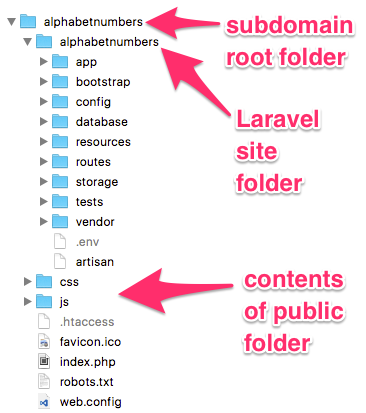
My solution was to create a directory in the subdomain root folder and copy all the code into there. I then copied the contents of the /public folder into the subdomain root folder and edited index.php.

The two require lines need modifying to remove the ‘..’ characters and replace with the actual path.

//require __DIR__.'/../bootstrap/autoload.php';
require __DIR__.'/mysubdirectory/bootstrap/autoload.php';

It’s not pretty but it worked OK.

The little application I wrote is to help with non-verbal reasoning tests, to memorise the numeric equivalents of the alphabet: Alphabet to Numbers.

Folder structure for running Laravel from site root folder

The Grid – Launch

I’m excited that my founder membership of The Grid has just been enabled. I’ve only spent a short time using it so far but it’s making WordPress feel ancient. The Grid uses AI to design the site according to the content and changes that design with time.

https://thegrid.ai/willis-owen

Windows 10 connect to Mac on local network

In 2016 it should be easy to move files between two computers on the same network. However it took me a little bit of time to find out how to do this with Windows 10. I was hoping it would be a case of enabling sharing on the Mac, finding it in the Network list on Windows and just moving the files – however it won’t appear on Windows unless you follow a few extra steps detailed below.

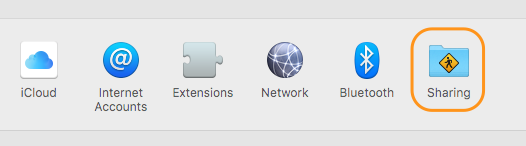
First enable File Sharing on the Mac, use the Sharing icon in System Preferences.

OS X System Preferences - Sharing

Tick File Sharing, make a note of your Mac’s name e.g. ‘richards-mini’ (or you can use your IP Address) then click ‘Options…’ and tick the checkbox next to your user name under Windows File Sharing.

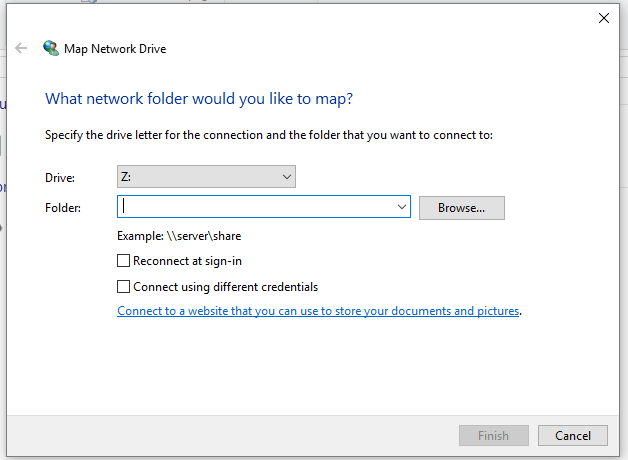
Now in Windows 10, run File Explorer, right click the Network icon on the left hand side and select ‘Map network drive…’, the following dialog box appears:

Windows 10 Map Network Drive

In the folder dropdown enter the Mac name or IP address of the Mac preceded by two back slashes e.g. \\richards-mini or \\192.168.1.123 then click ‘Browse…’, you should see your public folder listed there, select the ‘Drop Box’ folder then click OK.

You may be asked to authenticate – this requires the Mac username and password – not the Windows ones.

Finally you’ll see this as a new drive under ‘This PC’ list in File Explorer.

Once you have done, you may want to right click the mapped drive in Windows and choose Disconnect, then on the Mac switch File Sharing off afterwards just to be that little more secure.

Magento SQL query for customer with billing and shipping address

Here is an SQL query I construct to extract customers with billing and shipping address from a Magento 1.9 store.
This joins on table sales_flat_order_address to ensure that only customers that have ordered are included.

You may need to adjust the entity attribute id’s – if you look in those tables it is pretty obvious what each value represents.

SELECT
    ce.entity_id AS customer_id,
    ce.email,
    cev2.value AS firstname,
    cev3.value AS lastname,
    caet.value AS billing_first_line,
    caev1.value AS billing_town,
    caev2.value AS billing_postcode,
    sfoa.entity_id AS sfoa_entity_id,
    sfoa.street AS shipping_first_line,
    sfoa.city AS shipping_city,
    sfoa.postcode AS shipping_postcode
FROM
    customer_entity ce
    -- first name
    INNER JOIN
    customer_entity_varchar cev2 ON (ce.entity_id = cev2.entity_id
        AND cev2.attribute_id = 5)
    -- last name
    INNER JOIN
    customer_entity_varchar cev3 ON (ce.entity_id = cev3.entity_id
        AND cev3.attribute_id = 7)
    -- address first line
    INNER JOIN
    customer_address_entity cae ON (ce.entity_id = cae.parent_id)
    INNER JOIN
    customer_address_entity_text caet ON (cae.entity_id = caet.entity_id)
    -- town
    INNER JOIN
    customer_address_entity_varchar caev1 ON (cae.entity_id = caev1.entity_id
    AND caev1.attribute_id = 26)
    -- postcode
    INNER JOIN
    customer_address_entity_varchar caev2 ON (cae.entity_id = caev2.entity_id
    AND caev2.attribute_id = 30)
    -- sales
    INNER JOIN
    sales_flat_order sfo ON (ce.entity_id = sfo.customer_id)
    -- shipping address
    INNER JOIN
    sales_flat_order_address sfoa ON (sfo.entity_id = sfoa.parent_id)
    WHERE sfo.status = 'complete'

Email hosting with multiple accounts for a family

I have looked around for cost effective hosting for multiple mailboxes for example if you have your own domain name and want to give multiple family members email or if you run a small business with a few employees.

After a lot of research I recommend Tsohost (that’s an affiliate link but I’m not motivated by that – I only found out about their affiliate service after signing up for their hosting).

I looked at the services below before making my decision. Criteria were: Hosting for multiple mailboxes, webmail access, junk mail filtering, IMAP access, multi GB of storage, competitive price. Prices as at July 2016.

FastMail – based in the US, $40 per annum. I wasn’t keen on having email hosted in the US.

RunBox – based in Norway – that’s better than the US due to their privacy rules. $35 for main account but sub-accounts are an additional price and these can add up.

Fasthosts – £2 per month for 2 x 2GB mailboxes – not viable as I needed more for family

1 & 1 – £28.80 per annum with 2GB storage and 20 email accounts. This was one of the best offers and a real contender however the website didn’t mention junk mail filtering.

PlanetHippo – 10 mailboxes, 400MB size, £36 per year.

UK2 – Shared hosting with cpanel. £28.51 – doesn’t mention mailbox size or spam filtering.

Freeola EmailPro, has got antispam filters, £24 per annum, looked good but do I have to move my DNS to them and they didn’t offer any web hosting in that package.

Finally Vidahost/Tsohost. £29 annually (£31.32 including VAT) plus you get a free domain name. 2 GB storage shared between 25 mailboxes – web hosting that includes SSH access, Git, Cron, anti spam and 6 hosted websites. They were also recommended by a colleague who’d had good customer service for years.

Update January 2017 – With Vidahost you can now enable https on your website with a free SSL Certificate from Let’s Encrypt. Let’s Encrypt is available on all Cloud Hosting packages.

Update May 2018 – Vidahost has merged into Tsohost and the starter plan is now £34.80 annually.