Vagrant notes

Stop box checking for updates

If you want to stop your VM from checking for updates to the Vagrant box add the following immediately after the Vagrant.configure line:

# don't check for VM updates
config.vm.box_check_update = false

Update Guest Additions

There is a plugin: vagrant-vbguest which will check if your VirtualBox Guest Additions are out of date in your VM and automatically update if necessary. You can install it with:

vagrant plugin install vagrant-vbguest

Once the Guest Additions have been installed you may want to use the following to prevent further updates (add just after the Vagrant.configure line):

# don't update guest additions
config.vbguest.auto_update = false

Better synced folder permissions

Instead of the default synced folder settings which may cause problems when your server tries to change the files (e.g. WordPress updating itself) I use the following with Ubuntu:

config.vm.synced_folder "./", "/vagrant", id: "vagrant-root",
owner: "vagrant",
group: "www-data",
mount_options: ["dmode=775,fmode=664"]

If you are using CentOS then the group should be apache instead of www-data.

Magento performance

You can boost Magento performance (or any complicated PHP app) when running from a VM by changing the PHP OPcache revalidate frequency. It defaults to 2 seconds which means when you are navigating a site all the PHP files are recompiled with every click. With tens of thousands of PHP files that’s a hefty penalty.

Changing this to something like 20 seconds means you’ll be using cached code. Do this with:

sudo nano /etc/php5/apache2/php.ini

and set

opcache_revalidate_freq = 20
Easy Linux MySQL default configuration on cloud server

When you initially install MySQL on a cloud server (Ubuntu 14.04) the /etc/mysql/my.cnf file is configured to work with only 32M RAM. This is pretty crazy when you consider that most cloud servers have at least 1GB of RAM, it could be holding your website up so it is something you should consider changing.

If you want a quick way of boosting the MySQL performance without having to tune the configuration, then a number of pre-built configurations are stored in: /usr/share/doc/mysql-server-5.5/examples/

my-huge.cnf is for a system with memory of 1G-2G.

It would be nice if you could just copy this over my.cnf and restart MySQL but that doesn’t work. You’ll get the message start: Job failed to start

What needs changing to make this work on a recently installed system?

Edit the [mysqld] section, add user = mysql and that’s all you need to do if you are using MyISAM.

If you want to use InnoDB then remove the commented out section on Replication Slave (it’s unnecessary and just complicates understanding the file)

Uncomment the InnoDB section but leave the following line commented out:

#innodb_data_file_path = ibdata1:2000M;ibdata2:10M:autoextend

because by default it uses: innodb_data_file_path = ibdata1:10M:autoextend which is auto-extending.

Finally before starting MySQL you need to delete the log files with rm /var/lib/mysql/ib_logfile* because these details have changed.
That’s all you need to do. You’ll now be able to enjoy the extra performance of having a MyISAM key buffer of 384MB and an InnoDB buffer pool of 384MB.

Install Compass on Mac OS X 10.11

Use the following command in Terminal to install Xcode command line tools (you don’t need the full application from the App Store)

xcode-select --install

Then install SASS and Compass with:

sudo gem install -n /usr/local/bin sass

sudo gem install -n /usr/local/bin compass

then you can cd into your directory of choice and run compass compile to compile SASS into CSS.

How to block threats using CloudFlare Geolocation

CloudFlare is a great tool to help protect your website, there are plenty of blog posts about why so I won’t repeat that again here. One way to increase your security is to limit access to the admin pages of your website. If you have a fixed IP Address e.g. in your office at work then it is relatively easy to restrict access to just that address however if you or others need to access when on the go then this is too restrictive.

One solution that can prevent a lot of hacking attempts to block access to IP’s outside your home country.

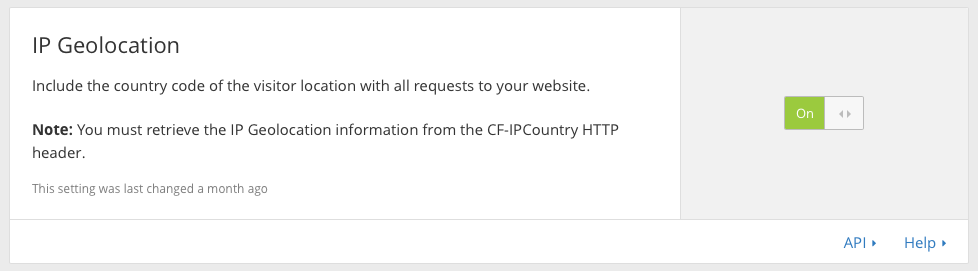
On the CloudFlare network screen you can enable IP Gelocation, it looks like this:

CloudFlare IP Geolocation

CloudFlare adds an extra HTTP header which you can access with Apache (code this within your Apache configuration file) and use to set a variable with the SetEnvIf directive. In the example below if the IP is from the UK, I set a variable to true:

SetEnvIf HTTP_CF_IPCOUNTRY GB NoBlock=true

Next you can check the value of that variable and issue rewrite directives accordingly, here is the full code which will issue an HTTP 403 Forbidden if they are not in the UK and trying to access a URL containing an admin path:

  RewriteEngine on
  # block access if not UK
  # send them Forbidden, no further rules evaluated
  SetEnvIf HTTP_CF_IPCOUNTRY GB NoBlock=true
  RewriteCond %{ENV:NoBlock} !^true$
  RewriteCond %{REQUEST_URI} ^/index.php/admin/(.)*
  RewriteRule .* - [F]

I have found this to be incredibly effective at stopping hacking attempts.

Times Tables

My times tables site is now back online at times-tables.willis-owen.co.uk. Rote learning is no longer fashionable but it still remains an effective tool to get kids to memorise times tables instead of trying to work out the sum in their heads each time.

Although this site is simple, it gives competitive kids a sense of achievement and there is nothing to distract them from the task at hand.

For parents there is no marketing / advertising and no agenda.

Times Tables screenshot

Technical Details

It has been updated to use the superb PHP Fat-Free Framework v3.5 which is now installable using Composer.